
The Problem
Businesses lose thousands of potential clients simply because of delayed replies, missed follow-ups, and the endless hours spent copying data from sheets to emails.
Here's the typical reality for a growing service business:
- A new inquiry arrives through a website form or landing page
- The data sits in a spreadsheet — unread, unacknowledged
- Hours or days pass before someone manually copies the details into an email
- No tracking, no reminders, no way to know who was followed up and who was missed
This isn't a tool problem. It's a workflow problem. The data is there. The intention to respond is there. What's missing is the connection.
The Solution
PARVAAZ engineered a zero-lag AI Agent Workflow using n8n — an open-source automation platform. The workflow connects three key steps into one seamless pipeline:
Trigger — Google Sheets
The moment a new lead row is added to a Google Sheet, the workflow wakes up. No manual checking, no polling delays.
Brain — AI Model
The AI reads the lead's context — name, company, inquiry type, source — and writes a human-like, hyper-personalized response. This isn't a robotic template. The AI adapts to every client uniquely.
Action — Gmail + Real-Time Notification
Within seconds, a tailored email is dispatched to the client. Simultaneously, the team receives a notification — so a human always knows what was sent and can follow up when needed.
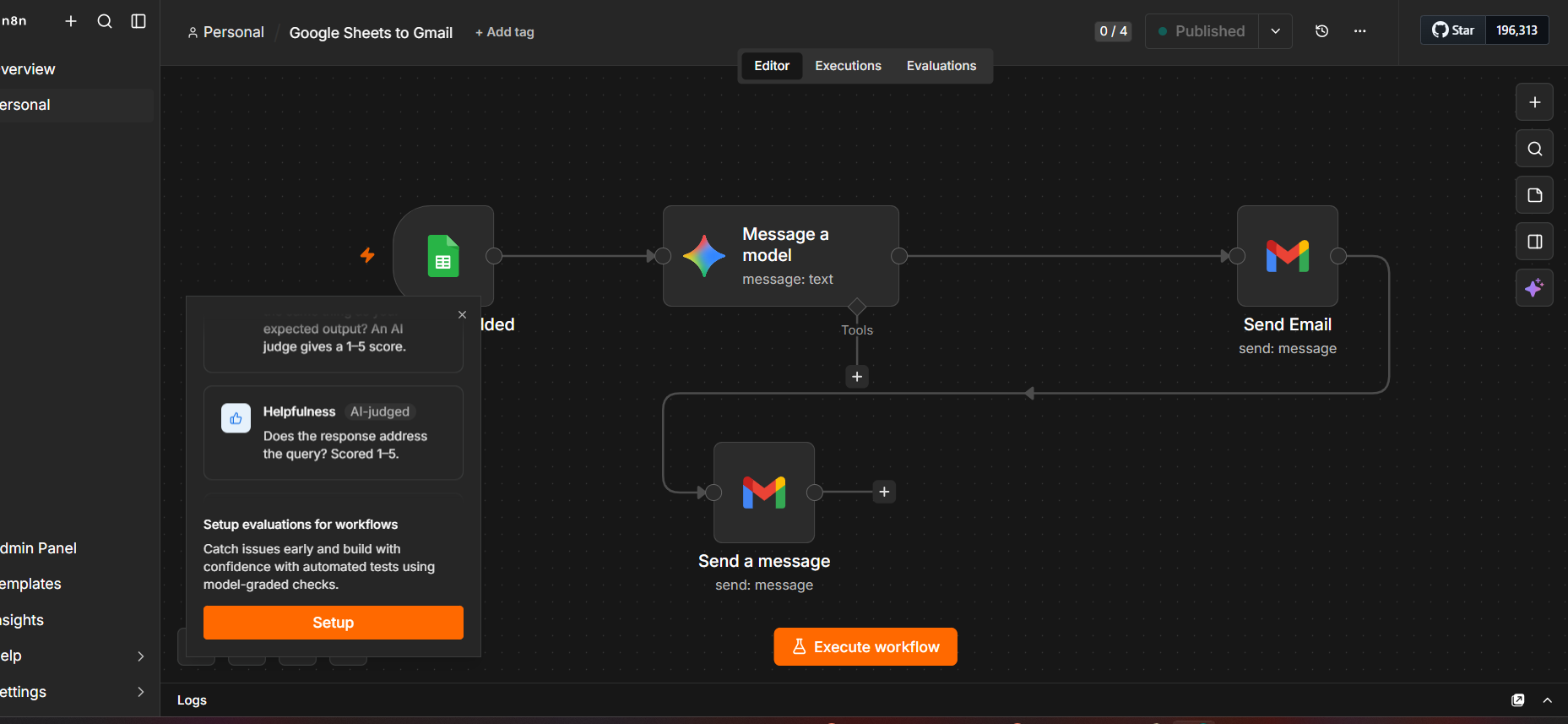
The complete n8n workflow — Google Sheets trigger → AI model → Gmail + notification
Why This Matters
⏱️ Instant Engagement
Stop keeping your leads waiting. Reply when they are warmest — within seconds of their inquiry, not hours or days later. Speed creates trust.
🧠 Human-Like Intelligence
No robotic, stiff templates. The AI reads the actual context of each lead and adapts the response. Every email feels personal because it is personal — based on real data.
📈 Scalable Growth
Run your outreach 24/7 on autopilot while your team focuses on closing deals, handling complex conversations, and building relationships. The machine handles the first touch — humans handle what matters.
Key Takeaways
- Start with one workflow. Don't try to automate everything at once. Pick one repetitive task — lead acknowledgement is a perfect first candidate.
- Define the trigger, brain, and action. Every useful automation has three parts: what starts it, what processes the data, and what happens as a result.
- Keep a human in the loop. Automation should reduce repetitive work, not remove human judgment. Define clear review and escalation points.
- Test, measure, then expand. Run the first workflow for a week. Measure response time, accuracy, and team feedback. Then decide what to automate next.
Want a Similar Workflow for Your Business?
PARVAAZ builds practical AI automation for growing businesses. We start by understanding your current process — the triggers, the data, the bottlenecks — and recommend one useful workflow that can be tested before expanding.